Skip to content
11 min read

ADA Website Compliance Checklist (2026)

A practical ADA compliance checklist for US website owners. Color contrast is just one piece — here's the full picture including WCAG standards, legal risks, and action items.

ADA website compliance has become one of the most pressing legal concerns for US businesses. In 2025, over 4,000 federal ADA lawsuits were filed targeting websites — and that number continues to grow. Whether you run a small e-commerce store, a SaaS platform, or a Fortune 500 site, understanding ADA requirements is essential.

This checklist covers everything you need to know about making your website ADA compliant, with a focus on the areas that matter most.
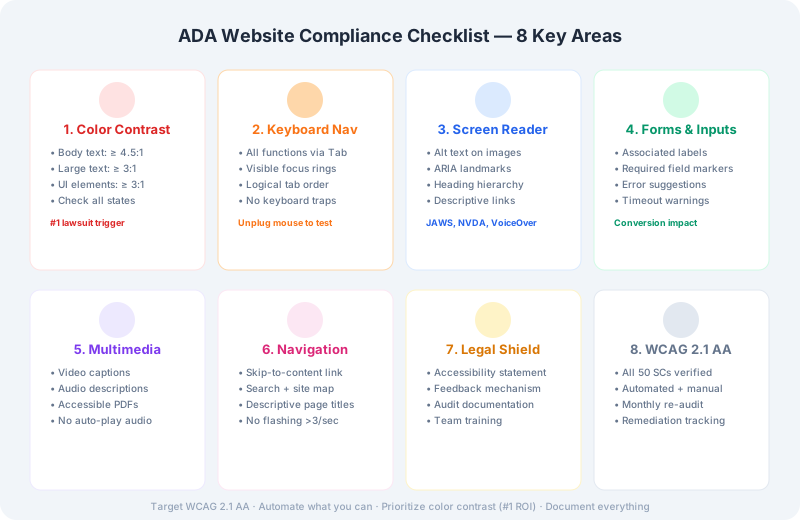
ADA Website Compliance Checklist — 8 key areas for web accessibility

The Americans with Disabilities Act (ADA) was signed into law in 1990 — before the commercial internet existed. Title III of the ADA prohibits discrimination on the basis of disability in "places of public accommodation." Courts have consistently interpreted this to include websites, even though the law doesn't explicitly mention them.

The Department of Justice has not issued specific technical regulations for web accessibility, but they've made clear through consent decrees and amicus briefs that WCAG 2.0/2.1 Level AA is the standard they reference. In practice, nearly every ADA website lawsuit uses WCAG 2.1 AA as the benchmark.

1. Color Contrast Compliance

Color contrast is the most commonly cited accessibility failure in ADA lawsuits — and the easiest to fix. Despite being straightforward to address, it consistently appears in the majority of demand letters and settlement agreements.

  • Body text: Minimum 4.5:1 contrast ratio (WCAG 2.1 SC 1.4.3)
  • Large text (24px+ or 19px+bold): Minimum 3:1 contrast ratio
  • Non-text elements (icons, borders, focus indicators): Minimum 3:1 contrast (SC 1.4.11)
  • All interactive states: Check default, hover, focus, active, and disabled states
  • All backgrounds: Test against solid backgrounds, gradients, and images
  • Use our Color Contrast Checker to verify every color pair on your site. Run a full scan at least monthly.

    2. Keyboard Navigation

    Many users with motor disabilities cannot use a mouse. They navigate entirely through keyboard commands using Tab, Shift+Tab, Enter, and arrow keys.

  • All functionality must be operable via keyboard alone (SC 2.1.1)
  • Visible focus indicators on all interactive elements (SC 2.4.7)
  • Logical tab order that follows visual layout (SC 2.4.3)
  • No keyboard traps — users should be able to tab in and out of every component (SC 2.1.2)
  • Test this yourself: unplug your mouse and navigate your entire site using only the keyboard. If you can't complete key tasks (forms, navigation, checkout), neither can your disabled users.

    3. Screen Reader Compatibility

    Color contrast is the #1 cited ADA violation. Scan your site in one click and fix issues before they become demand letters.

    Get the Chrome Extension

    Screen readers like JAWS, NVDA, and VoiceOver convert on-screen content to speech. Making content compatible requires specific markup.

  • Meaningful alternative text on all images (SC 1.1.1)
  • ARIA landmarks identifying regions like navigation, main content, and search
  • Proper heading hierarchy (h1 → h2 → h3) without skipping levels
  • Descriptive link text — never "click here" or "read more" without context
  • Form labels properly associated with input fields
  • Error messages announced by screen readers (SC 4.1.3)
  • Dynamic content updates announced via ARIA live regions
  • 4. Forms and Inputs

    Forms are frequently the most challenging part of accessibility. An inaccessible form can prevent users from completing purchases, registrations, or contact requests.

  • Every input field has a programmatically associated label (SC 1.3.1)
  • Required fields are clearly indicated (visually and programmatically)
  • Error suggestions provided when input fails validation (SC 3.3.3)
  • Error prevention on legal and financial transactions (SC 3.3.4)
  • Adequate time to complete forms (or option to extend time)
  • 5. Multimedia and Documents

  • Video captions — all pre-recorded video must have synchronized captions (SC 1.2.2)
  • Audio descriptions — video content must be described for blind users (SC 1.2.5)
  • PDF documents available on the site must be accessible (tagged, readable order)
  • No auto-playing audio lasting longer than 3 seconds without a pause mechanism
  • 6. Navigable Content

  • Skip navigation link at the top of every page (SC 2.4.1)
  • Multiple ways to find content — site map, search, or consistent navigation (SC 2.4.5)
  • Page titles that describe the page topic or purpose (SC 2.4.2)
  • Breadcrumbs or other orientation cues on multi-step processes
  • No content that flashes more than 3 times per second (SC 2.3.1 — seizure prevention)
  • Beyond fixing technical issues, consider these legal best practices:

  • Publish an accessibility statement on your website committing to WCAG 2.1 AA compliance
  • Provide a feedback mechanism for users to report accessibility issues
  • Conduct periodic audits — automated scans catch ~30% of issues; manual testing is essential
  • Document your compliance efforts — this shows good faith and can reduce damages
  • Train your team — developers, designers, and content creators should all understand accessibility basics
  • 8. Cost-Effective Prioritization

    If you can't fix everything at once (and most organizations can't), prioritize by impact:

    1. Color contrast — cheap to fix, high litigation risk

    2. Keyboard navigation — affects a wide range of disabilities

    3. Screen reader basics — alt text, headings, form labels

    4. Forms and error handling — essential for transaction completion

    5. Multimedia — captions and transcripts

    Color contrast is one of the highest-ROI accessibility fixes you can make. Start there, use our Contrast Checker to identify failures, and work through the rest of this checklist systematically. Your users — and your legal team — will thank you.

    Get the Free WCAG Contrast Checklist (PDF)

    Every color pair that passes WCAG AA, plus the 10 most common failures — in one PDF. Free, no spam.

    No spam, ever. One email with the checklist, then occasional accessibility tips. Unsubscribe anytime.

    Found this useful?

    Try our free tools for your next project

    ADA website complianceADA compliance checklistwebsite accessibility requirementsWCAG ADA complianceaccessibility lawsuit prevention
    Check your colors now

    Continue Reading

    ADA website complianceADA compliance checklistwebsite accessibility requirementsWCAG ADA complianceaccessibility lawsuit preventionADA color contrast requirements