
You Google 'free accessibility checker chrome extension.' You get a dozen results. You click one. It asks you to create an account. You click another. It installs, then shows a paywall after three scans. Sound familiar?
Most 'free' accessibility checkers aren't actually free — they're free trials, freemium tools with hard limits, or data-harvesting services disguised as accessibility tools. This post explains what to look for in a genuinely free checker and why ours is different.
What Makes an Accessibility Checker Actually Free?
Before installing anything, ask four questions:
1. Does it require an account? If you need to sign up before scanning, the tool isn't free — you're paying with your email address and usage data. A truly free checker works without authentication.
2. Are there scan limits? Some extensions cap you at 5 or 10 scans before demanding a subscription. If you're auditing a site with 50+ pages, a limit makes the tool useless after the first few URLs.
3. Where do the calculations run? Tools that send your page data to a server for processing cost the developer money — which means you'll eventually pay. Local-processing tools have zero marginal cost and can stay free indefinitely.
4. Is the code auditable? Closed-source accessibility tools can collect data without your knowledge. Open-source or locally-running tools let you verify the privacy claims.
Our Answer: The ColorContrast Chrome Extension
The ColorContrast Chrome Extension checks all four boxes:
| Requirement | How We Handle It |
|---|---|
| No account | No sign-up, no registration, no email — ever |
| No limits | Scan as many pages as you want, as often as you want |
| Local processing | All WCAG and APCA calculations run in your browser — zero data leaves your machine |
| Auditable | The extension runs locally; the contrast engine is open-source |
What You Get in One Click
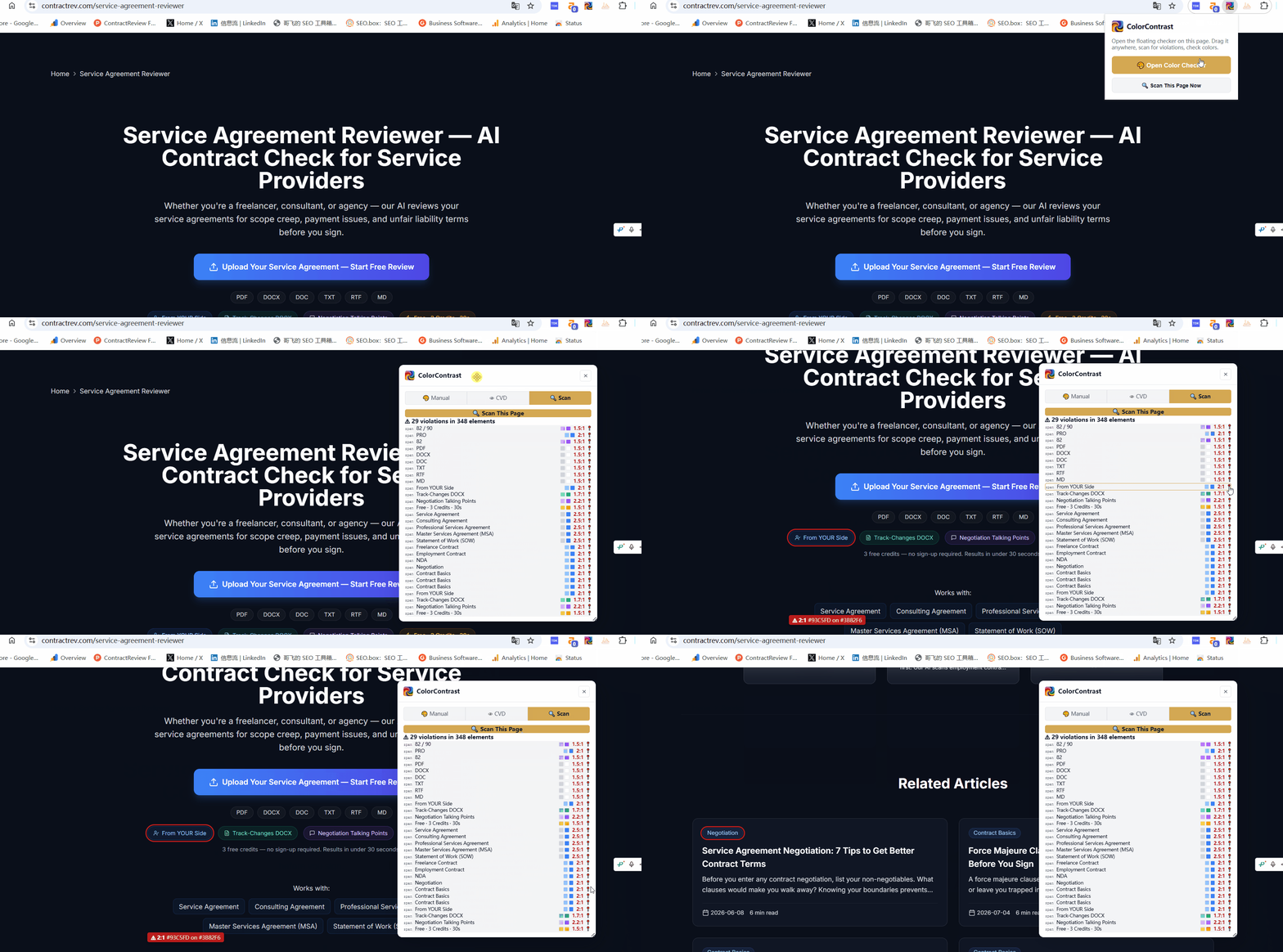
After installing the extension (30 seconds from the Chrome Web Store), here's what happens when you click the scan button:
1. Full DOM scan — The extension walks every visible text element on the page: paragraphs, headings, buttons, links, labels, list items. For each one, it extracts the computed foreground and background colors using the browser's own CSS cascade engine.
Scan any page for contrast violations in one click. Free Chrome extension — no account, instant results.
Get the Chrome Extension2. WCAG AA/AAA grading — Every element gets a pass/fail verdict at both AA and AAA levels, with font-size-aware thresholds (large text needs only 3:1, body text needs 4.5:1).
3. APCA scoring — In addition to WCAG, you get APCA (Advanced Perceptual Contrast Algorithm) Lc scores — the candidate replacement for WCAG 2.x contrast in WCAG 3.0.
4. Element highlighting — Each violation in the results list has a locate button. Click it, and the extension scrolls to the element, outlines it in red, and shows a floating label with the contrast ratio.
5. Accessible alternatives — Click any failing color pair to see WCAG-compliant alternatives sorted by visual similarity. One click applies the replacement.
Beyond the Scanner: Eyedropper, Manual Checker, and More
The page scanner is the headline feature, but the extension also includes:
How It Compares to Other Free Checkers
| Feature | ColorContrast | axe DevTools | WAVE | Stark |
|---|---|---|---|---|
| Account required | No | No (free tier) | No | Yes (freemium) |
| Scan limits | None | None | None | 3 projects free |
| Local processing | Yes | Partial | Partial | No (cloud) |
| APCA support | Yes | No | No | No |
| Element highlighting | Yes | Yes | Yes | N/A (design tool) |
| Accessible alternatives | Yes (one-click) | No | No | Yes (design tool) |
| Eyedropper | Yes | No | No | No |
| No sign-up | Yes | Yes | Yes | No |
Most alternatives are excellent tools — axe DevTools and WAVE are industry standards for comprehensive accessibility audits. But they're audit tools first, contrast checkers second. ColorContrast focuses specifically on contrast: faster scans, APCA support, and one-click color fixes that the broader audit tools don't offer.
Who Should Use This
Designers auditing their own work in production. Spot contrast issues on the live site before a client or user reports them. The eyedropper makes it easy to sample colors from any element for inspiration or comparison.
Developers integrating accessibility into CI/CD. Run quick contrast scans on staging deployments, internal dashboards, and client sites before shipping. Catch regressions before they reach production.
Accessibility consultants doing triage. Scan a prospective client's site in seconds to estimate the scope of contrast issues before writing a proposal. The violation count gives you a concrete number to include in your audit pitch.
Content creators and marketers. Ensure your blog posts, landing pages, email templates, and social media graphics use readable color combinations. No technical knowledge required — install and click scan.
Install in 30 Seconds
1. Go to the Chrome Web Store listing
2. Click 'Add to Chrome'
3. Pin the extension to your toolbar
4. Visit any page and click the extension icon to start scanning
That's it. No account creation, no email verification, no credit card. The extension works immediately on any page you visit.
Also Available: Figma Plugin
If you're a designer who wants to catch contrast issues before they reach the browser, install our free Figma Color Contrast Checker Plugin. Select any layer for instant WCAG + APCA results and apply accessible alternatives without leaving your design file.
Two tools, same engine, both free — design-side and production-side coverage for zero dollars.